


Sporcle Party: Social Trivia
4.294.00 Reviews
App Specs
- Version
- 1.5.15
- Updated On
- License
- Free
- Downloads
- 5,000,000+
- Developer
- Sporcle, Inc
- Categories
- Trivia
- Platform
- Android, iOS
Screenshots
 Analysis by AppCompare
I find trivia works best in a group when nobody has to study beforehand and the rules are easy to pick up. That is the appeal of Sporcle Party: Social Trivia: it gives friends and family a shared activity for a get-together, rather than turning a phone into a solitary quiz machine. I’d consider it for a casual evening when conversation needs a nudge, though it suits people who enjoy answering under a little time pressure more than those looking for a quiet, self-paced puzzle.
A shared screen can make an ordinary evening feel like a game night
One practical way I’d use it is to bring it out after dinner, once everyone has settled in but nobody wants to commit to a long board game. A host can set up a round and let the group take turns thinking through questions, reacting to close calls, and teasing one another over missed answers. That kind of short, low-preparation activity is where a social trivia game can earn its place: it gives a mixed group something specific to do without requiring everyone to bring materials or know the same rules in advance.
It can also suit a video call when friends or relatives are apart. The original game experience supports playing locally or inviting people from afar, so the basic idea is not limited to a single room. I would still agree on who is hosting and how everyone will follow along before starting; the app can provide the quiz, but it cannot organize a scattered group’s conversation for you. If people are joining from different places, a stable connection and a plan for taking turns help keep the game from becoming a string of interruptions.
For a household, the shared-device question is worth thinking through before handing over a phone. A single device may be convenient for a group gathered around it, but the person holding it naturally controls the setup and pace. I’d have the host keep the phone in a central spot and make sure everyone can see and hear what is happening, rather than letting the device quietly become one player’s private screen. If each person wants to use their own phone, decide that as a group first instead of assuming the same setup will work for every session.
Keep the host role and account boundaries simple
When I’m hosting, I’d treat the game as a group activity rather than a reason to pass one person’s personal account or device access around. The app’s social play is useful for bringing people together, but that does not mean everyone needs access to the host’s other apps, messages, or settings. A household can keep those boundaries ordinary: the host handles the phone, players participate in the round, and nobody needs to share a personal login just to join the fun.
That small bit of preparation also makes the start less awkward. I’d choose a category that gives the group a fair chance, explain how the round will run, and settle any practical questions before the timer begins. If younger players are present, an adult can handle setup and decide whether the questions and pace feel right for that particular group. This is a better approach than assuming a general age label means every child will enjoy every topic.
There is a trade-off to the host-led approach: it is easy to get a game moving, but the host also takes on the work of choosing a suitable activity and keeping the group coordinated. For a household where everyone wants equal control over choices, a physical trivia deck or a board game may feel more balanced. Here, I’d use the phone as the facilitator, not as the center of attention.
Worth Reading Before You Choose

Flipboard Shows What News Apps Must Do Beyond the Feed

Switching to Android Auto Means Rethinking Your Driving Routine

Google Calendar Makes a Crowded Week Easier to Manage

Ludo King Makes the Most of the Minutes Between Plans

Baby Panda World Brings Quick Play to Modern Phones, but Its Game Library Feels Busy

ESPN’s Live Game View Makes Following Close Games Easier
Getting Started with Sporcle Party
First things first, downloading Sporcle Party: Social Trivia is a breeze. Available on both Android and iOS, the app is free to download, although it does offer in-app purchases if you’re looking to unlock additional features. Once installed, you’ll be greeted with a simple yet engaging interface that gets you right into the action without any unnecessary frills.
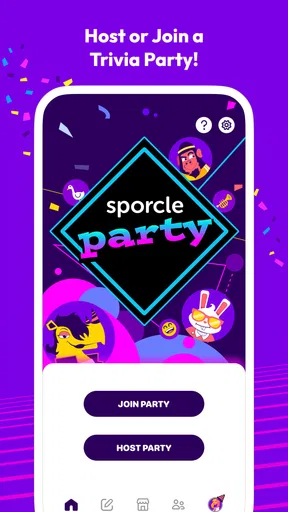
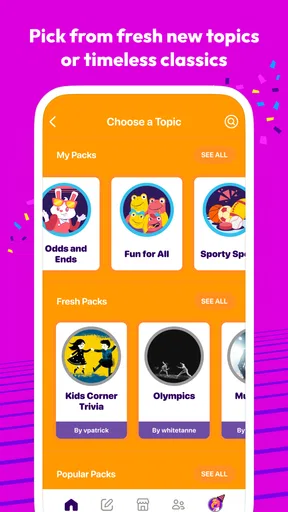
The app allows you to either join a game or create your own. I personally love hosting, so I usually opt to create my own trivia games. The setup is intuitive, with clear instructions guiding you through the process. You can choose from a variety of categories, ensuring there’s something for everyone, whether they're history buffs or pop culture enthusiasts.
The Gameplay Experience
Now, onto the gameplay itself. Sporcle Party offers a smooth and interactive experience that keeps everyone on their toes. You can play with friends locally or invite them from afar, which is perfect given our current need for digital connections.
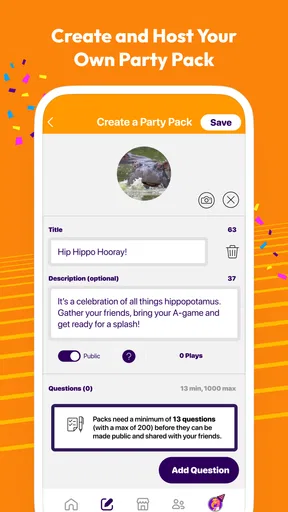
One of the standout features is the ability to customize your trivia games. You can pick and choose from a plethora of subjects, setting the difficulty level to suit your group’s expertise. This flexibility means you can tailor the game to your audience, ensuring everyone is engaged and having a blast.
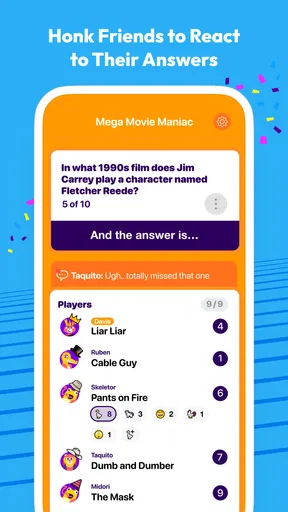
During the game, questions are timed, adding an element of pressure that keeps things exciting. Trust me, the adrenaline rush you get when the timer starts ticking down is all part of the fun! Plus, the app’s scoring system is straightforward, so everyone knows where they stand throughout the game.
Social Features and Accessibility
What sets Sporcle Party apart from other trivia apps is its strong social component. You can easily chat with friends during the game, sharing banter and friendly competition. It’s this social interaction that truly elevates the app, transforming a simple trivia game into a memorable social event.
The app is also incredibly accessible. Whether you’re playing on a smartphone or tablet, the interface is responsive and easy to navigate. This means you can host a game from virtually anywhere—be it your living room, backyard, or even on a road trip.
Why You’ll Love It
If you’re a trivia aficionado, you’ll appreciate the sheer variety of questions available. From obscure facts to well-known tidbits, there’s always something new to learn. Plus, the app frequently updates its question bank, keeping the content fresh and challenging.
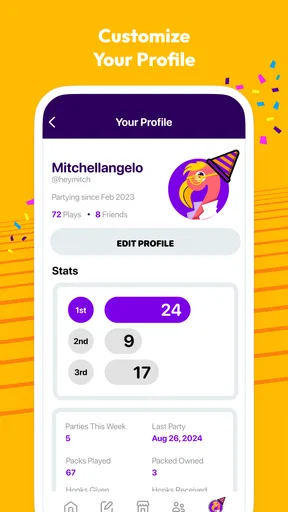
For those who love a bit of competition, Sporcle Party provides leaderboards and achievements, adding another layer of excitement. And if you’re someone who enjoys hosting events, the app’s customization options make it easy to tailor games to your specific needs.
How it fits alongside other trivia options
Compared with solo quiz apps, this is a better pick when the point is to share reactions and compete with people you know. A solo quiz is more convenient for a few spare minutes, and it avoids the coordination needed to get a group together. Sporcle Party instead makes the host’s choices and the group’s banter part of the experience. If your friends are not available, or you mainly want to practice facts on your own, a single-player quiz is likely the more sensible choice.
It also occupies a different space from a boxed trivia game. A physical game can be easier when everyone wants to read at their own pace or take a break from screens, while this app is handy when the group wants a quiz without pulling out a board and cards. The trade-off is that a phone-based session depends on the host managing the device and the group’s attention. I’d choose the app for an informal gathering and a tabletop game for a planned game night where everyone wants a more tactile, screen-free activity.
Small hosting choices make a noticeable difference
One useful tip is to pick a category for the group, not just for the person who knows the most. A subject that is too narrow can turn a social round into a spectator sport, while a familiar theme gives less experienced players a way into the conversation. If the group has sharply different interests, vary the subjects rather than trying to find one perfect category that suits everyone. The customization is most valuable when it helps distribute the fun, not when it simply gives the strongest player a home advantage.
The timed format is another reason to think about who is playing. It adds energy and makes quick guesses entertaining, but it can also frustrate anyone who prefers time to consider an answer or feels uncomfortable being put on the spot. I’d keep the mood light, especially with children or guests who are new to trivia, and treat the score as part of the joke rather than a verdict on who is clever. If your group dislikes countdown pressure, a slower quiz format will probably be a better match.
There is also a practical difference between a game that is technically available to a group and one that is comfortable for everyone to follow. Before a round, I’d check that people can see the screen and hear the host, then keep side conversations from swallowing the questions. In a busy room, a smaller group around the device may work better than trying to make every guest participate at once. This is a simple way to avoid the common problem of people losing interest because they missed what was asked.
Age, trust, and who should sit this one out
The game is rated Everyone 10+, which gives households a useful starting point when deciding whether it belongs in a family gathering. I would still make the decision based on the actual players and the topics chosen: an age rating is not a promise that every category will suit every child, nor does it replace an adult’s judgment. For younger children, I’d have an adult lead the session and select content they are comfortable discussing.
It is free to download, with optional in-app purchases priced from $0.99 to $6.99 per item. I’d make that distinction clear if children use the device: free access does not mean every purchase decision should be left to them. The simplest household boundary is to let an adult handle any purchase prompts and keep the phone with the host. That avoids confusion without pretending the app provides family controls or account settings that I cannot describe.
The game is made by Sporcle, Inc, and it has an average rating of 4.4 from around 14,000 ratings, with more than a million installs. Those figures suggest that it has found an audience, but they do not tell me whether a particular household will enjoy timed trivia. It is most promising for groups that like friendly competition, flexible topics, and talking while they play. I’d skip it for people who want a private, untimed quiz, dislike screens at gatherings, or find scorekeeping and fast answers stressful.
What to expect before you install
The game was released on April 9, 2020, and its current version is 1.5.11. It requires Android 6.0 or later on Android devices. Those details are useful when checking an older phone or tablet before a planned gathering, rather than discovering at the last minute that the device cannot run it. Since the game is available for Android and iOS, the platform choice is broad, but each participant should check their own device before relying on a remote session.
One question people often have is whether a group can use it without turning the evening into a complicated setup. In my view, the join-or-create structure makes the basic plan easy to explain: choose a host, decide on a subject, and get everyone ready before starting. The host still needs to guide the group, especially when people are joining from afar, so I would not expect the app to replace ordinary coordination. A quick message about when to join and what device to use can save more time than trying to sort it out mid-game.
Another reasonable question is whether it works for a mixed-age family or a group with very different knowledge. It can, provided the host chooses topics thoughtfully and keeps the competition friendly. Customization gives you room to aim at the group rather than accept a one-size-fits-all quiz, but no setting can make everyone equally interested in every subject. I’d rotate who gets to suggest a category so the same person does not define every round.
Finally, consider whether you want a shared activity or a collection of individual challenges. The social elements, including chat, suit people who enjoy reacting together, while the timer and visible scoring give the round a competitive edge. Those same qualities are not universal advantages: a quiet household or a group that prefers open-ended conversation may find the structure intrusive. Knowing that before you install is more helpful than assuming every trivia fan wants the same kind of game.
Final Thoughts
In a world where social interactions are increasingly digital, Sporcle Party: Social Trivia offers a delightful way to connect with friends and family. Its combination of engaging gameplay, social features, and accessibility makes it a standout choice for any trivia lover.
So, if you’re looking to spice up your next gathering or simply want to challenge your brain with some fun trivia, give Sporcle Party a try. Trust me, you won’t be disappointed!
My household verdict
For a household that enjoys quizzes and has one person willing to host, I think this is an easy game to keep in mind for an unplanned evening. It gives a group a clear shared task, lets the host shape the subject, and can bring distant friends into the same kind of friendly competition. The best results come from matching the category and pace to the people in the room, not from chasing a high score.
I would not make it the default choice for every family gathering. If the group wants everyone to control their own pace, if some players are uncomfortable with timed answers, or if screen-free conversation is the goal, a different activity will serve them better. But when the mood is playful and people are happy to follow a host’s lead, I can see why this trivia game works: it gives a shared device a purpose without asking the group to turn the evening into a serious contest.
Pros
- Engaging multiplayer mode enhances social experience.
- Wide variety of trivia categories to explore.
- User-friendly interface with intuitive navigation.
- Regular updates with new questions keep it fresh.
- Customizable games for personalized experiences.
Cons
- Requires internet connection for most features.
- Some categories may have limited questions.
- Occasional ads can disrupt the gameplay.
- In-app purchases for premium features.
- Limited offline functionality for solo play.
FAQs for Sporcle Party: Social Trivia
What is Sporcle Party: Social Trivia?
Sporcle Party is a social trivia app that lets you play fun and engaging quizzes with friends. It offers a wide range of categories and topics, allowing users to test their knowledge and compete in real-time. The app is designed for group play, making it perfect for parties, gatherings, or virtual hangouts.
How do I create or join a game in Sporcle Party?
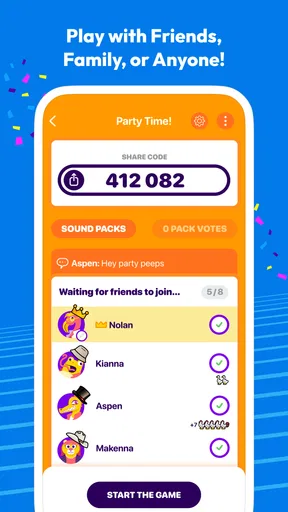
To create a game, launch the app and select 'Create a Game.' You can choose from various categories or mix them up. To join a game, you'll need a game code from the host. Simply enter this code in the app, and you'll be part of the trivia fun with your friends.
Is Sporcle Party free to play?
Yes, Sporcle Party is free to download and play. However, there are in-app purchases available, such as additional trivia packs, that enhance the gaming experience. These purchases are optional, and the core gameplay remains accessible to all users without spending money.
Can I customize trivia questions in Sporcle Party?
Yes, Sporcle Party allows users to customize trivia questions. You can create your own quiz by entering custom questions and answers, making the game more personal and tailored to your group’s interests. This feature is great for themed parties or special occasions.
What devices are compatible with Sporcle Party?
Sporcle Party is available for both Android and iOS devices. Ensure your device meets the minimum system requirements for optimal performance. The app is regularly updated to improve compatibility and introduce new features, so keeping your app updated is recommended.


